
How to Fill Out a Fax Cover Sheet (Step by Step, With Example)
Quick answer
To fill out a fax cover sheet, write the date, the recipient’s name and fax number, your own name and fax number, the total number of pages (including the cover sheet), a short subject line, and any notes. If the fax holds private information, keep the confidentiality notice at the bottom.
A fax cover sheet takes about two minutes to fill out. This guide walks you through every field, shows a completed example, and lists the small mistakes that cause faxes to get lost. Need a blank sheet first? Jump to the free template.
What you need before you start
Have these details ready so you can fill out the sheet in one go:
- The recipient’s name, department and fax number
- A phone number for the recipient, in case the fax doesn’t go through
- Your own name, fax number and phone number
- The documents you’re sending, in the right order, so you can count the pages
- Any reference number the receiver uses, such as a claim, case, account or application number
How to fill out a fax cover sheet, step by step
Step 1: Pick the right cover sheet
A standard cover sheet works for most faxes. If you’re sending medical records, legal papers or anything private, use one with a confidentiality notice. For company faxes, a business fax cover sheet with your company name looks more professional.
Step 2: Write the date
Use the date you’re sending the fax. The receiver uses it to match your fax with calls, emails or deadlines.
Step 3: Fill in the “To” section
Write the recipient’s full name, their company or department, their fax number and their phone number. Adding the department matters in big offices, where one fax machine can serve dozens of people. Check the fax number twice, including the area code.
Step 4: Fill in the “From” section
Add your name, company, fax number and phone number. If a page is missing or hard to read, this is how the receiver reaches you.
Step 5: Count the pages
Write the total number of pages, and include the cover sheet in that number. If you’re sending a 3-page form, write 4. This lets the receiver check that every page arrived.
Tip: writing “4 (including cover)” removes any doubt about whether the cover sheet was counted.
Step 6: Write a clear “Re” line
The “Re” line is the subject of your fax. Name the document and add any reference number, for example “Claim #A-20418: itemized bill.” Avoid vague subjects like “Documents” or “Info.”
Step 7: Tick a status box
Most cover sheets have boxes like Urgent, For Review, Please Reply and Please Comment. Tick the ones that tell the receiver what to do next. Only mark Urgent when it truly is, so it keeps its meaning.
Step 8: Add a short note
Use the comments area to say what’s attached and what you need. Two or three lines are enough: what the pages are, what action you expect, and by when.
Step 9: Check the confidentiality notice
If your fax includes personal, medical, financial or legal details, keep the confidentiality notice at the bottom of the sheet. It asks anyone who receives the fax by mistake to tell you and destroy it.
Step 10: Do a final check and send
Put the cover sheet on top, keep the pages in order, and make sure your page count matches. Then send the fax. If it’s important, call the receiver afterward to confirm it arrived.
Filled-in example
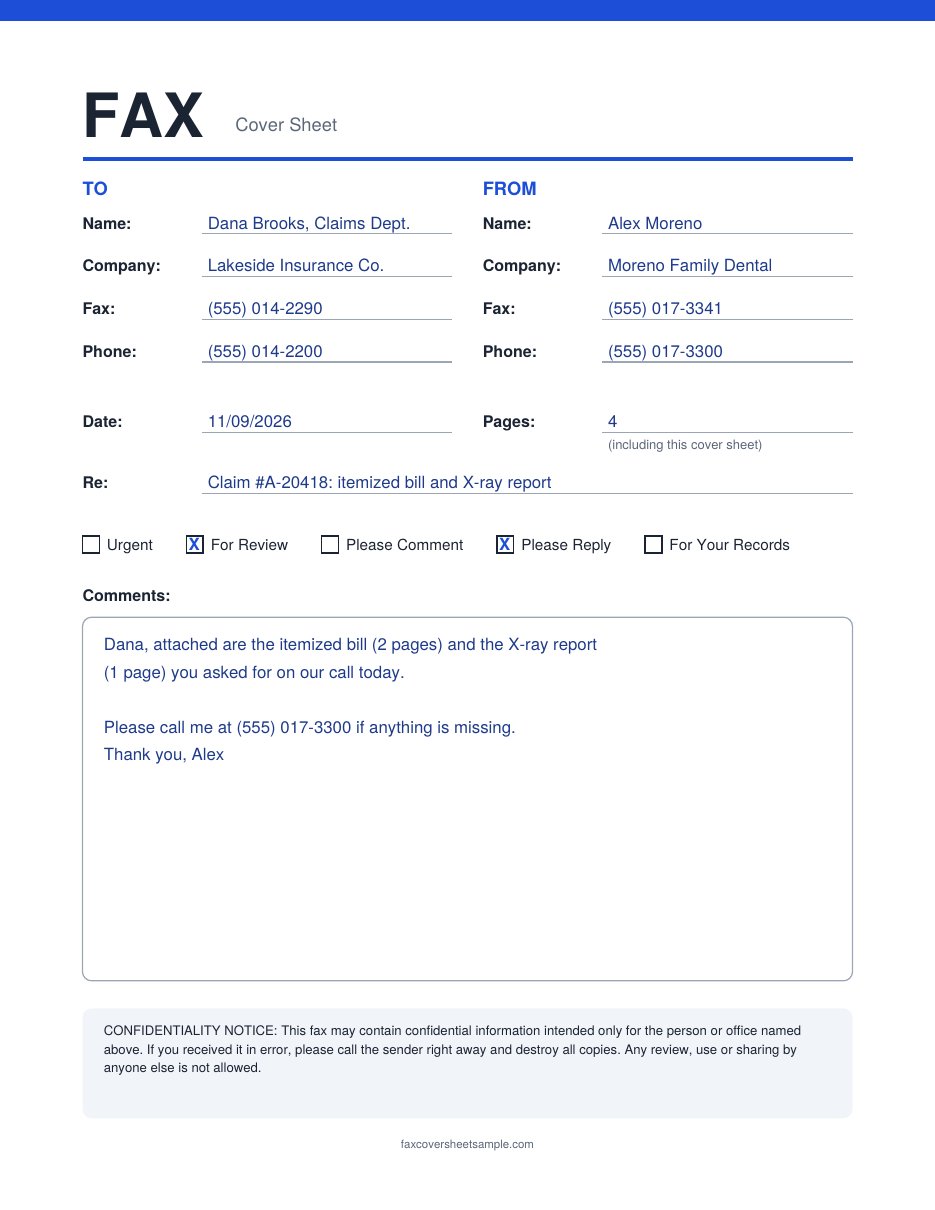
Here’s a completed cover sheet from a dental office sending claim documents to an insurance company. All names and numbers are made up.
Why this example works:
- The “To” line names a department (“Claims Dept.”), so the fax reaches the right desk even if Dana is out.
- The page count is 4: a 2-page bill, a 1-page X-ray report, plus the cover sheet.
- The “Re” line has the claim number, so the receiver can file it without calling back.
- The note lists what’s attached and gives a phone number in case anything is missing.
- No private details on the cover. The patient’s name and health details stay on the inside pages.
Common mistakes to avoid
- Using an old fax number. Offices change numbers. Confirm it if you haven’t faxed them recently.
- Leaving out the cover sheet from the page count. The receiver may think a page is missing.
- Putting private details on the cover. Anyone near the fax machine can read the first page. Keep Social Security numbers, health details and account numbers off it.
- Writing too lightly. Faxes are sent in black and white, and pencil or light ink can fade out. Use a dark pen and print clearly.
- Forgetting a callback number. Without it, the receiver has no quick way to ask about a missing page.
Medical, confidential and government faxes
Medical faxes: keep patient details off the cover sheet and use a sheet with a confidentiality notice. Also follow your office’s own privacy rules. See our medical fax cover sheet templates.
Confidential business or legal faxes: choose a sheet with a clear privacy notice and mark it for a named person. See our fax cover sheets with a confidentiality statement.
IRS and other government offices: fax numbers often depend on the form or the letter you received. Use the number printed on that form’s instructions or your notice, and put the form name and any reference number in the “Re” line. See our IRS fax cover sheet.
Faxing one specific person: an attention fax cover sheet puts their name front and center.
FAQs
Do you count the cover sheet as a page?
Yes, in most cases. Include it in the total so the receiver can check that every page arrived. Writing “(including cover)” next to the number avoids confusion.
Can I fill out a fax cover sheet by hand?
Yes. Print the PDF, use a dark pen, and write in clear block letters so it stays readable after faxing.
Can I type on a fax cover sheet?
Yes. Download the Word version, type your details, then print it or save it as a PDF to send with an online fax service.
What should I write if I don’t know the recipient’s name?
Use the department or job title, such as “Billing Department” or “Hiring Manager.” Add a phone number for the office if you have one.
Do I need a cover sheet when faxing online?
It’s still a good idea. Most online fax services let you add a cover page, and the receiver gets the same useful details as with a paper fax.
Free template