How to Send a Fax Without a Fax Machine (5 Easy Ways)
You do not need a fax machine to send a fax. Most people today fax from a website, a phone app or their email, and it takes a few minutes. If you only fax once in a while, a print or shipping store can send it for you.
Below are 5 ways to send a fax without a fax machine, what each one needs, and how to add a cover sheet so your fax reaches the right person.
Quick Comparison
| Method | What you need | Cost | Best for |
|---|---|---|---|
| Online fax website | Internet and a PDF or photo of your document | Free for a few pages, or a monthly plan | Most people |
| Fax app on your phone | A smartphone camera | Pay per fax or a monthly plan | Faxing on the go |
| Email to fax | An online fax account | Included with the account | People who fax often |
| Store or library | Your paper documents | A fee per page | Faxing once in a while |
| Computer with a fax modem | A fax modem and a landline | Free software, but you need the hardware | Offices with an old setup |
1. Use an Online Fax Service
An online fax service sends your document over the internet to the receiver’s fax machine. The receiver gets a normal paper fax and will not know you used a website.
- Scan or save your document as a PDF. A clear phone photo also works on most services.
- Fill in a fax cover sheet and save it as a PDF too.
- Go to the online fax service and enter the receiver’s fax number, including the area code.
- Upload the cover sheet first, then your documents.
- Click send and wait for the confirmation email or on-screen message. Keep it as proof that the fax went through.
Free or paid? Some services let you send a few pages a day for free, usually within the US and Canada, and may add their own branding to the first page. If you fax often, or need to send many pages, a paid plan removes those limits and lets you receive faxes too.
2. Use a Fax App on Your Phone
Fax apps for iPhone and Android turn your phone camera into a scanner. You snap each page, the app cleans it up, and you send it to a fax number. This is handy when you need to send a signed form and you are away from a computer.
- Take photos in good light, on a flat dark surface, so the edges are easy to detect.
- Check every page in the preview before you send. Blurry pages are the most common reason a fax is hard to read.
- Most apps let you add a cover sheet. If the app’s cover sheet is too basic, attach your own PDF cover sheet as the first page instead.
3. Send a Fax From Your Email
Many online fax services let you fax from your normal email account once you sign up. You write an email to a special address that includes the fax number, such as the fax number followed by the service’s email domain, and attach your documents. The service turns the attachments into a fax and emails you a confirmation.
The exact address format is different for each service, so check its help page. Send from the email address you used to sign up, or the fax may be rejected.
4. Go to a Store or Library
Many print and shipping stores, such as FedEx Office, The UPS Store, Staples and Office Depot, send faxes for a fee per page. Some public libraries offer faxing too. This is a good choice if you only need to send a fax now and then.
- Call ahead to check that the location has fax service and to ask about the price, which varies by store and by whether the fax is local, long distance or international.
- Bring a filled-in cover sheet. Stores often have blank ones, but your own saves time. Print one of our free fax cover sheets before you go.
- Ask for the transmission report when the fax is done. It shows the number dialed, the page count and whether the fax went through.
5. Fax From a Computer With a Fax Modem
Windows includes a program called Windows Fax and Scan that can send faxes, but only if your computer has a fax modem connected to a landline phone line. Most new computers do not have a fax modem, so this option mainly suits offices that already have the hardware. For most people, an online fax service is easier.
Don’t Forget the Cover Sheet
A cover sheet tells the receiver who the fax is from, who it is for and how many pages to expect. It matters even more with online faxing, because the fax may land in a busy shared office.
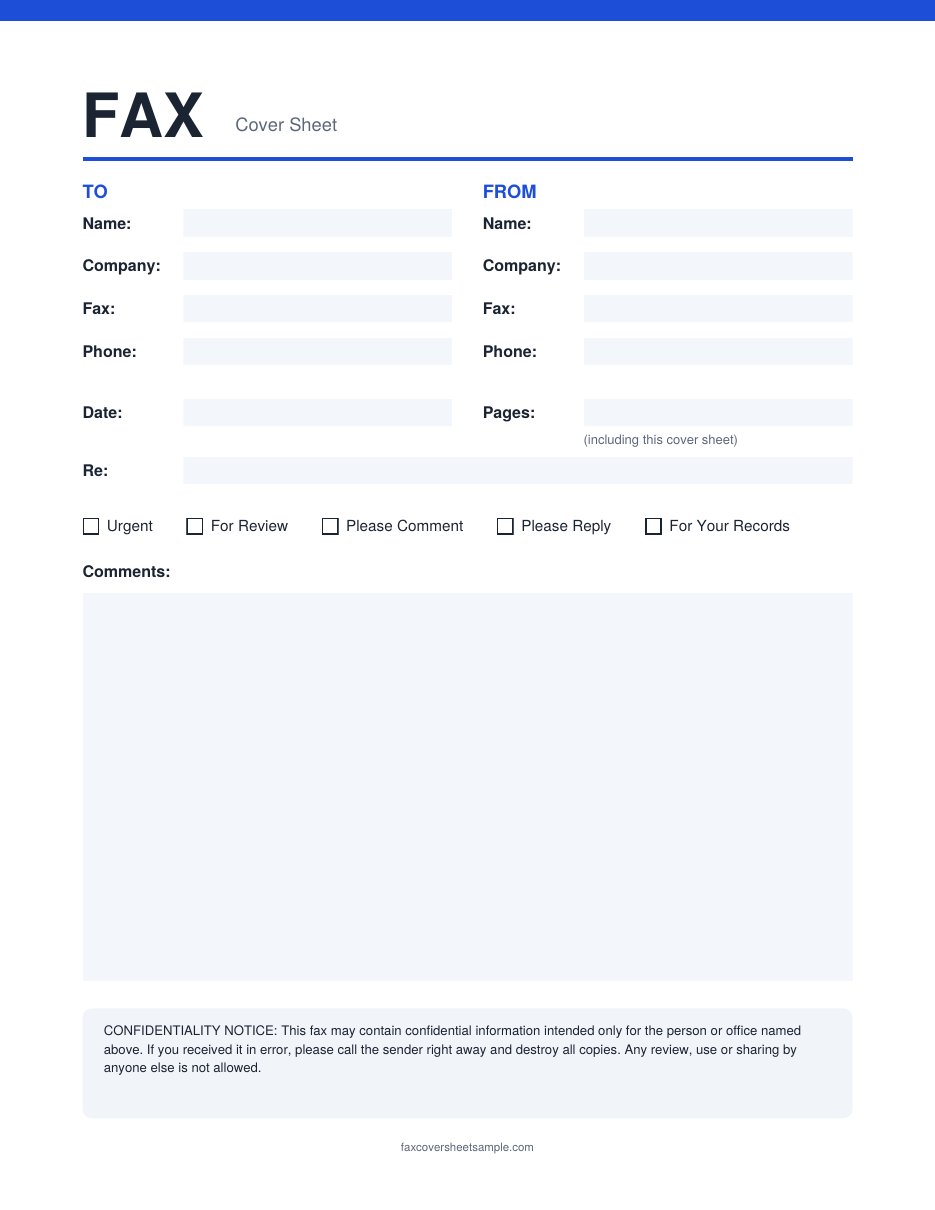
Fillable PDFBest for: online fax and fax apps
Free Fillable Fax Cover Sheet
Type your details straight into this PDF, save it, and upload it as the first page of your online fax. No printing or scanning needed.
Need a different style? See our PDF fax cover sheets, Word templates and Google Docs templates, or read how to fill out a fax cover sheet.
How to Receive a Fax Without a Fax Machine
To receive faxes, you need a fax number. Paid online fax plans give you one, and incoming faxes arrive as PDFs in your email or in the service’s app. Free sending services usually do not include a number for receiving. A store can sometimes receive a fax for you, but call first to ask.
Tips for a Fax That Arrives Clearly
- Check the number twice. In the US, dial the full 10-digit number. Some services also need a 1 in front. A wrong digit sends your fax to a stranger.
- Use black and white. Faxes only send black and white, so color shading and light grey text can turn into dark blocks or fade away.
- Count the pages. Write the total on the cover sheet, including the cover sheet itself.
- Keep the proof. Save the confirmation email or transmission report until you know the fax was received.
- Be careful with private papers. For medical, legal or financial documents, use a service that encrypts your files, and add a confidentiality notice to your cover sheet. Businesses sending health information should use a service that will sign a HIPAA business associate agreement.
FAQs
Can I send a fax for free without a fax machine?
Yes. Some online fax services let you send a few pages a day for free, usually to fax numbers in the US and Canada. Larger faxes, international faxes and receiving faxes usually need a paid plan.
Can I fax from my phone?
Yes. Use a fax app, or open an online fax website in your phone’s browser and upload a photo or PDF of your document.
Can I send a fax from Gmail?
Yes, if you have an account with an online fax service that offers email to fax. You send the email to the address format the service gives you, with your documents attached.
Does the receiver need a fax machine?
They need a fax number. It can belong to a fax machine or to an online fax service. Either way, your fax arrives like any other fax.
Is faxing online safe?
It can be. Choose a service that uses encryption, check the fax number before sending, and include a confidentiality notice on your cover sheet for private documents.