Free Fax Cover Sheet Template Word (Confidential, HIPPA)
A fax cover sheet in Word is the quickest way to make a cover sheet that looks the way you want. You can type your details on screen, add your logo, change the wording, and save a copy to reuse every time you fax. Below are 7 free Word templates, followed by simple steps for editing them.
Want a file that is ready to print as it is? See our fax cover sheet PDF templates. For every format in one place, browse all fax cover sheet templates.
Free Fax Cover Sheet Templates for Word
Click a preview to see it full size. Each download opens in Microsoft Word, and also works in Google Docs, LibreOffice and Pages.

WordBest for: office faxes that need a reply
Classic Word Fax Cover Sheet
A bold FAX title with lines for To, Fax, Phone and Re, then From, Pages, Date and CC. Four tick boxes (Urgent, For Review, Please Comment, Please Reply) and a message box finish the page. Click after any label in Word and start typing.

WordBest for: a clear, easy-to-read layout
Memo Fax Cover Sheet for Word
A large FAX heading framed by dotted lines, with To, Fax and Date on top and From, Fax and Pages below. A Memo box takes up the bottom half, so this one suits faxes that need a longer note.

WordBest for: filling in on screen or by hand
Boxed Fax Cover Sheet for Word
Receiver and sender details sit in two separate boxes, with a tall Notes box underneath. The boxes keep your typing lined up, even if you change the font size in Word.
NewWordBest for: businesses with their own letterhead details
Company Details Fax Cover Sheet
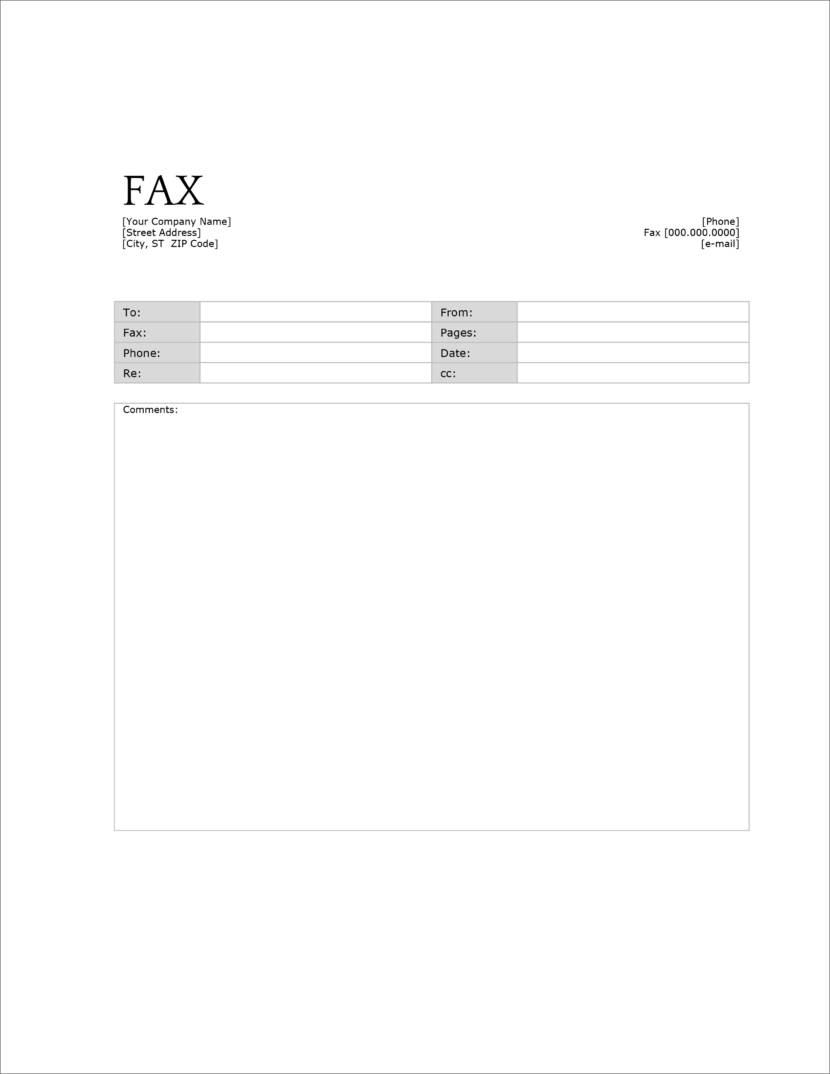
Your company name, address, phone, fax and email sit at the top. Below is a neat table with shaded labels for To, Fax, Phone, Re, From, Pages, Date and CC, and a large Comments box. Replace the text in square brackets with your details once, then save it for every fax. This design had no download before, so the Word file is new.

WordBest for: private business documents
Confidential Fax Cover Sheet for Word
Your From, Fax and Phone details go in a box at the top, next to the FAX title. The receiver’s details follow, with CONFIDENTIAL in the middle of the page and a confidentiality statement at the bottom. You can edit the statement in Word to match your company’s wording.

NewWordBest for: clinics, labs and medical offices
HIPAA Health Information Fax Cover Sheet
A centered “Health Information Fax Cover Sheet” title, with From, To, Fax and Date lines, a “cover sheet plus ___ pages” count and lines for comments. A bold notice warns that health information is enclosed, and a second notice tells a wrong receiver what to do. It is now available as an editable Word file, as well as the original PDF.

WordBest for: sensitive faxes with lots of notes
Lined Fax Cover Sheet with Notice
A big FAX title, then Date, To, From, Fax and Pages lines and a Re line. Ruled lines fill the middle of the page for a typed or handwritten note, and a short confidentiality notice sits at the bottom.
How to Edit a Fax Cover Sheet in Word
- Download the template and open it in Microsoft Word.
- If a yellow bar says Protected View, click Enable Editing. Word shows this for any file downloaded from the internet.
- Click just after a label, such as To:, and type. On table templates, click inside the empty cell next to the label.
- Replace any text in square brackets, like [Your Company Name], with your own details.
- To add a logo, click where you want it, then go to Insert > Pictures. Drag a corner of the image to resize it.
- Check the page count before you print. Count the cover sheet as page 1.
Save Your Details Once and Reuse Them
Fill in only the details that never change, such as your name, company, phone and fax number. Then go to File > Save As and choose Word Template (.dotx). Next time, open the template, and Word starts a fresh copy with your details already in place. You only add the receiver, date and pages.
Turn Your Word Cover Sheet into a PDF
Most online fax services work best with PDF files. In Word, go to File > Save As (or File > Export on a Mac) and pick PDF. Upload the PDF as the first page of your fax, before your other documents.
Don’t Have Microsoft Word?
You can still use every template on this page:
- Google Docs: upload the file to Google Drive, then open it with Google Docs. See our Google Docs fax cover sheets for step-by-step help.
- Word for the web: free with a Microsoft account. Upload the file to OneDrive and open it in your browser.
- LibreOffice Writer: a free desktop program for Windows, Mac and Linux that opens Word files.
- Pages on a Mac: open the Word file in Pages, then export it as a PDF or Word file when you are done.
Fixing Common Problems in Word
- The title bar says Compatibility Mode. Some templates use the older .doc format. They work fine. To update the file, go to File > Info > Convert.
- The layout moves around. Switch to View > Print Layout so you see the page exactly as it will print.
- A second, blank page appears. Shorten the comments, or select the empty line at the very end and set its font size to 1.
- Typing removes the line under a field. Press Insert on your keyboard to turn off overtype, or type in the table cell instead of on the line.
- The fax looks faint on the other end. Use black text in a regular font at 11 points or larger. Light grey text and thin fonts often fade when faxed.
More Fax Cover Sheet Templates
- Fax cover sheet PDF (fillable and printable)
- Fax cover sheet for Google Docs
- Basic fax cover sheet
- Confidential fax cover sheet
- Professional fax cover sheet
- Personal fax cover sheet
- Blank fax cover sheet
- Standard fax cover sheet
- Simple fax cover sheet
- IRS fax cover sheet
- Fax cover sheet examples
- Attention fax cover sheet
FAQs
Are these Word fax cover sheets free?
Yes. All 7 templates are free to download, edit and print for personal or business use. No sign-up is needed.
Does Microsoft Word have its own fax cover sheet templates?
Yes. In Word, go to File > New and search for “fax”. The templates on this page give you more layouts, including confidential and health information versions.
Can I add my company logo?
Yes. Click where you want the logo, go to Insert > Pictures, and pick your logo file. The Company Details template already has space for your company name and contact details at the top.
Will the templates work on a Mac?
Yes. They open in Word for Mac and in Pages. In Pages, keep an eye on the spacing and check the layout before you print.
Should I send the cover sheet as a Word file?
No. Print it for a fax machine, or save it as a PDF for an online fax. A PDF keeps the layout the same on the receiver’s end.